Create the student account
Set up each learner with their own secure account and individual learning profile.
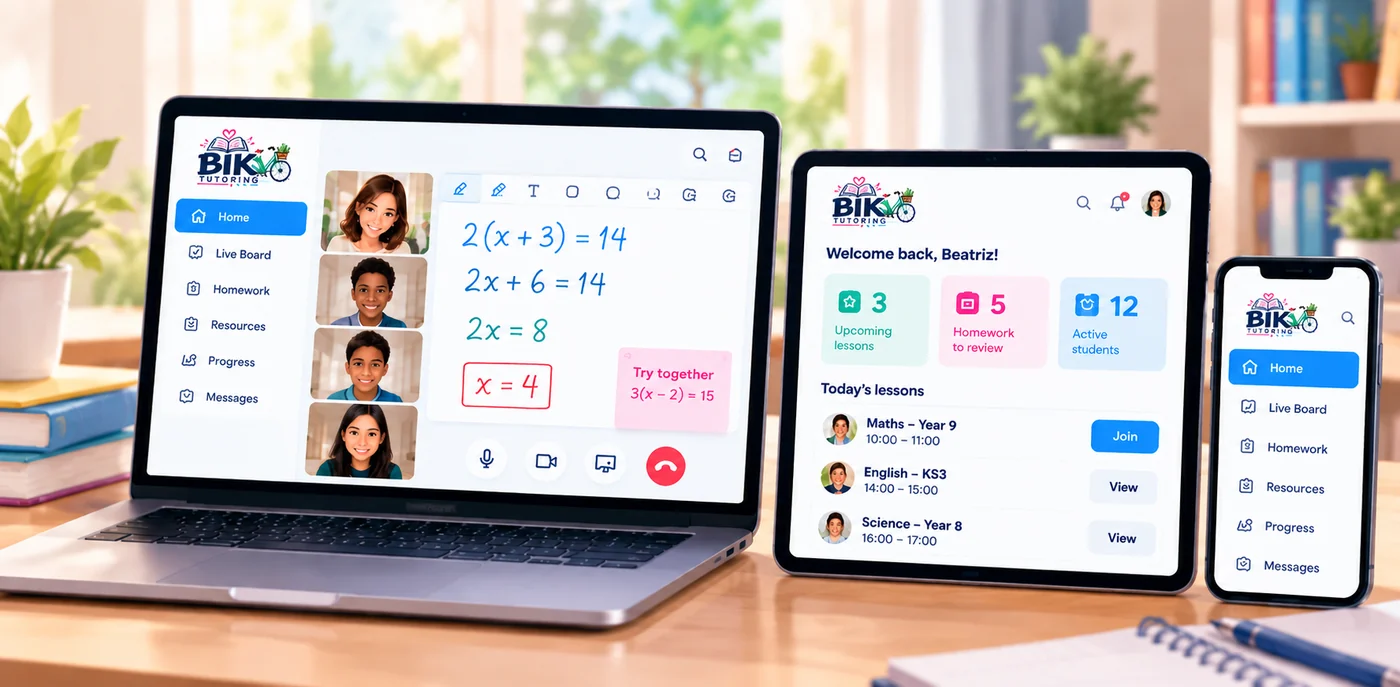
BIK Tutoring combines live teaching, an interactive whiteboard, secure student access, homework, resources and progress tracking in one simple learning space.
2x + 6 = 14
2x = 8
x = 4Each part of the platform supports the lesson journey before, during and after teaching.
Set up each learner with their own secure account and individual learning profile.
Students use their own details to access lessons, homework, resources and their profile.
Teacher and student join the same private online lesson space at the scheduled time.
Use video, voice, screen sharing and the collaborative Live Board while teaching.
Share homework, useful resources, lesson notes and clear next steps after the session.
Keep lesson history, attendance, learning goals and progress organised over time.
BIK keeps the important parts of online tutoring together instead of spreading the lesson across multiple services.
Each learner has a secure login where they can see lessons, homework, resources and their learning information.
Teacher and student can write, draw, highlight, add text and notes, create shapes and work together in real time.
Talk face-to-face during an online lesson with integrated camera and microphone controls.
Share a screen to explain websites, worksheets, presentations, documents and other lesson material.
Keep follow-up work and next steps connected to the learner rather than lost across messages and links.
Share useful learning resources and keep attendance, lesson history, goals and progress organised.
Talk, explain, demonstrate and solve problems together without leaving the BIK learning environment.
✓ Two-way collaborative whiteboard
✓ Camera and voice for live teaching
✓ Teacher screen sharing
✓ Pen, highlighter, text, sticky notes and shapes
✓ Move, delete, undo and redo board content
✓ Private lesson access controlled by the teacher
Individual access keeps each learner's information and learning area separate.
See previous and upcoming lessons and keep attendance information together.
Useful links and learning materials stay available in the student's portal.
Keep learning goals, lesson outcomes, homework and progress connected to the learner.
Book a conversation to discuss the learner, ask questions and see how online lessons work.
Add BIK Tutoring to your home screen for quick access.